
4.1 Registering Lorries Leaving Compound with Cement
When a lorry is leaving the compound after passing the weighbridge, you need to inform the system. Find the lorry that is leaving in Table 3 ( Lorries in compound). Click on that lorry. The "Lorry exiting from compound" box appears.
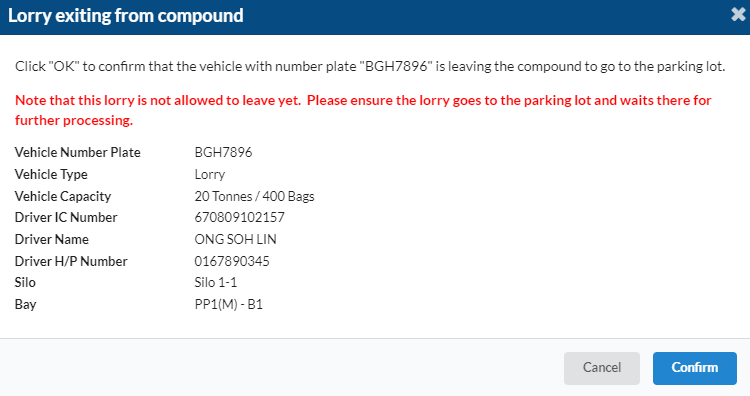
Check the particulars of the lorry and driver. If the information is correct, click "Confirm". The lorry information will disappear from Table 3.
4.1 Registering Lorries Leaving Compound without Cement
If a lorry is unable to fulfill the order for any reason after entering the compound (for example, because of breakdown), you need to confirm that the lorry is leaving the compound without cement.
Find the lorry in Table 3. Click on the lorry, and the " Lorry exiting from compound" box appears. After clicking "Confirm", the "Warning: Lorry is not yet supposed to leave compound" box appears.
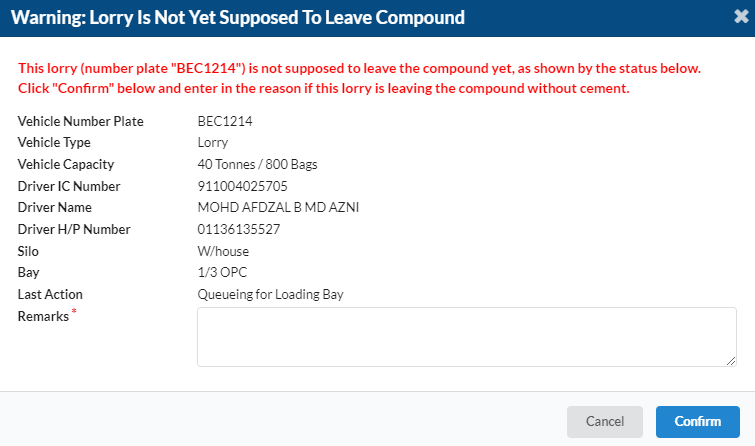
Check the lorry information. If this is the correct lorry, type in a reason for the lorry leaving without cement, such as "Lorry breakdown".
Click "Cancel Lorry". The lorry will disappear from Table 3.
